In short: for racing, DRIFTIT (real drifting, stick and pedals), PolyTrack (time trials) or Drift Boss (one finger). For a quick arcade run, Subway Surfers. For something calm, 2048, Wordle or chess on Lichess. All free, none needs an app. A Dark Room and Universal Paperclips do not run on phones in the browser.
How we checked
On 7 November 2026 we opened each game in a browser set to a phone's screen (375 × 812 pixels, with a phone's user agent) and looked at whether it loads, fits and offers touch play, or sends you away. For the games on Poki we also read the device line and the mobile controls on the game's own page. Two limits, plainly: that is a phone-sized browser, not a thumb on every game, and Wordle would not open in our test browser, so that entry rests on what the game is, not on this check.
Racing and driving
1. DRIFTIT (top-down drifting)
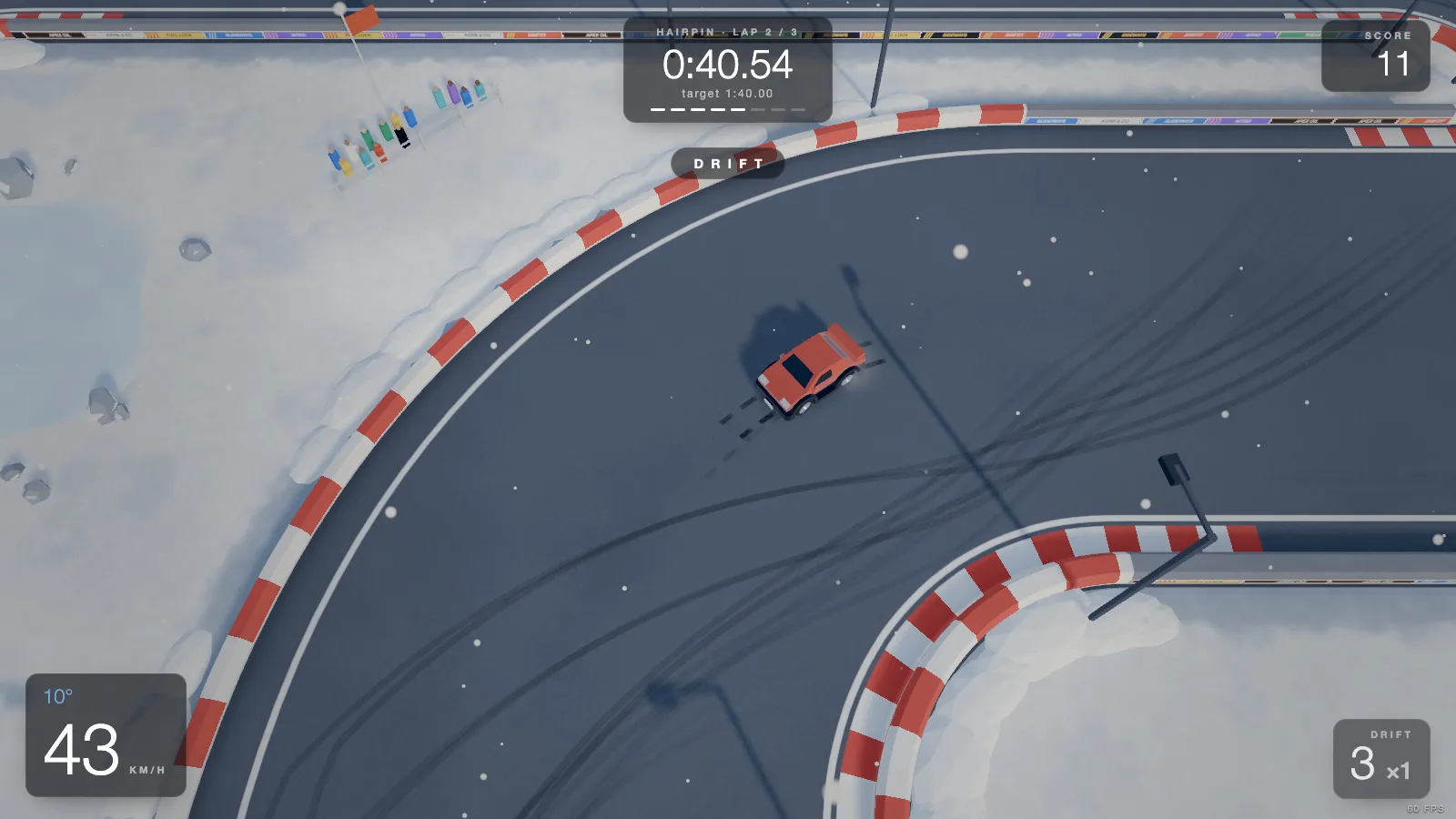
Ours, so we read the code. DRIFTIT is a top-down drift game: 20 short tracks, three laps each, a ghost of your best run and online leaderboards. Most drift games on a phone are one-button toys, and this one is not: you steer, you hold the throttle and you break traction yourself.
- Touch controls: a round stick on the left steers, GAS and BRAKE sit on the right, DRIFT (the handbrake) sits above them.
- The trick: slide your thumb from GAS up onto DRIFT as you turn in. The gas stays on, so the car rotates without losing speed. The same idea is explained in how to drift.
- Either way up: it works with the phone upright or sideways.
One honest note: the game itself tells you it is best on a computer, because it was made for a keyboard or a gamepad, then offers Play here and Send me the link. Touch works, but your fastest laps will come on a keyboard. Start on the Hairpin, or see all the tracks.
Play DRIFTIT free Buy on Steam
2. PolyTrack (low-poly time trials)
Kodub's track-builder racer, free on Poki, which lists it for desktop, phone and tablet. Touch controls arrived in version 0.4.0, and version 0.5.1 added a setting that swaps the accelerate and steering buttons to the other sides. You drive with on-screen pedals and race ghosts and leaderboard times rather than cars beside you, which suits a phone: no lobby, just another try.
3. Drift Boss (one finger)
The simplest drift game going. On Poki you tap the screen to drift and lift your finger to stop, and the car follows a narrow road until you fall off it. It is a timing game more than a driving game, and it is the best pick here for one hand on a bus. Want more depth? See games like Drift Boss.
4. Drive Mad (physics stunts)
Short side-on levels where a wobbly vehicle has to reach the flag in one piece. Poki gives the phone controls as tap and hold on the arrows to go forward and back. Short taps save bad landings, so two thumbs are all it asks.
5. Moto X3M (bike stunts)
A side-on bike game of ramps, flips and traps, listed for desktop, phone and tablet on Poki. Poki's page does not spell out the phone controls, so this is the one racing pick where you find them when it opens.
6. HexGL (anti-gravity racing)
A WipEout-style racer built with three.js by Thibaut Despoulain, free at hexgl.bkcore.com. Its control menu offers touch alongside keyboard and gamepad. Development has been on hiatus for years, so treat it as a tech demo with a great track, and use a recent phone. More like this in the best browser racing games.
Arcade
7. Subway Surfers (endless runner)
The app that everyone knows also runs in the browser on Poki, listed for desktop, phone and tablet. Swipe left and right to change lanes, up to jump and down to roll. It was born on phones, so touch is its natural home, and no install means nothing left behind on your storage.
Puzzles and word games
8. 2048 (numbers)
Gabriele Cirulli's number puzzle, free at play2048.co. The page fits a phone screen with no sideways scroll: slide the tiles, merge equal numbers, reach 2048. There is no timer, so you can stop mid-game at any stop.
9. Wordle (daily word)
Six tries at one five-letter word a day, on the New York Times site. It has its own on-screen keyboard, which is why it feels at home on a phone. This is the one entry we could not open in our test browser, as noted above.
10. Lichess (chess)
Lichess is free, has no ads, and its site fits a phone screen. Play a stranger, the computer or a daily puzzle without an account. Turn-based games are the safest choice on a phone, since a shaky connection or a stray thumb costs you very little.
11. Little Alchemy 2 (combining)
Start with four elements and drag them together to discover hundreds more. littlealchemy2.com opens with a Play button at phone size. Dragging with a finger is exactly what it wants, and there is no way to lose.
12. The Password Game (absurd rules)
Neal Agarwal's game keeps adding stranger rules to the password you are typing. It fits a phone screen, and your phone's keyboard does the work. It is a text box, so bring patience rather than reflexes.
All twelve at a glance
| Game | Type | Touch controls | Hands |
|---|---|---|---|
| DRIFTIT | Drift racing | Stick, GAS, BRAKE, DRIFT | Two |
| PolyTrack | Time trial | On-screen pedals | Two |
| Drift Boss | Timing | Tap and lift | One |
| Drive Mad | Physics stunts | Hold the arrows | Two |
| Moto X3M | Bike stunts | Not listed by Poki | Not listed |
| HexGL | Anti-gravity | Touch mode in its menu | Two |
| Subway Surfers | Runner | Swipes | One |
| 2048 | Puzzle | Slide the tiles | One |
| Wordle | Word | On-screen keyboard | One |
| Lichess | Chess | Move the pieces | One |
| Little Alchemy 2 | Puzzle | Drag | One |
| The Password Game | Word | Phone keyboard | Two |
Two famous ones that do not run on phones
Every list of great browser games names these two, so here is what you get when you open them at phone size:
- A Dark Room: it sends you to a page saying it is not mobile-friendly and needs arrow keys, and points to its apps.
- Universal Paperclips: the page says the web version was not designed for phones and points to the mobile version.
Neither is broken. Their authors simply made the phone version an app. Keep them for a computer, along with our keyboard-only games.
Getting a smoother game on a phone
- Turn off Low Power Mode or Battery Saver for racing games. Both can slow the browser down, and that is what makes a fast game feel sticky.
- Close other tabs. A 3D game wants the phone's memory, and a browser with forty tabs has little to spare.
- Unlock screen rotation if a game asks you to turn the phone.
- Be wary of "download" prompts. Search results for these games are full of copies on odd domains. A real browser game needs no file, so if a page wants an install, close it. The links above go to the games' own pages or to Poki.
- Plug in a controller if you own one. Some browser games accept a Bluetooth pad. See browser games with controller support, and try it in our gamepad tester.
Questions
Can you play browser games on a phone? Yes, if the game was built with touch in mind. Open its address in Chrome or Safari and play. Many still expect a keyboard, and some say so.
Is there a drift game I can play on my phone without an app? Yes. DRIFTIT runs in the phone's browser with a stick and pedals, and Drift Boss is the one-finger option.
Do browser games work on an iPhone? Those built on standard web technology do, in Safari or Chrome. Turn Low Power Mode off for racing games.
Do phone browser games need Wi-Fi? They need a connection to load, and online games need one while you play. Mobile data is fine, but a 3D game downloads more when it opens than a word game does.
More lists
- Games without downloading: the same idea on a computer.
- Short games for a break: the five-minute kind.
- Free drift games: every free way to go sideways.
- One-handed games: sorted by the hand you have free.