In short: the best keyboard-only games are platformers, puzzle, rhythm, racing and typing games. Free in a browser tab: DRIFTIT (drifting, arrows or WASD + Space), Celeste Classic, Chrome Dino, 2048, Monkeytype and PolyTrack. On PC: Celeste, Hollow Knight, Undertale, The Binding of Isaac, Crypt of the NecroDancer, Baba Is You and Super Hexagon; free on PC: Trackmania and the fighting game Fantasy Strike. Shoot 'em up and survival: Touhou and Cataclysm: Dark Days Ahead. Old-school and free: Tetris, NetHack, Dungeon Crawl Stone Soup and Zork. Every one is played start to finish with no mouse; the table has the keys.
What counts as keyboard only
Lots of lists call a game "keyboard friendly" when you can move with the arrow keys but still need the mouse for menus, inventories or aiming. Our rule is stricter: the game itself is played entirely from the keys. Where we know the menus work without a mouse too, we say so. The genres that fit best are platformers, puzzle and rhythm games, racing and typing games, plus the genres that are older than the mouse: falling blocks, roguelikes and text adventures. Fighting games sit in between: most accept a keyboard but are built for stick motions, and one is designed for keys. Shooters, modern strategy and card games almost never fit.
| You like… | Start with |
|---|---|
| Racing | DRIFTIT, PolyTrack, Trackmania |
| Fighting | Fantasy Strike |
| Platformers | Celeste Classic, Celeste, Hollow Knight |
| Puzzle | 2048, Baba Is You, Tetris |
| Rhythm and reflexes | Crypt of the NecroDancer, Super Hexagon, Chrome Dino |
| RPG and roguelike | Undertale, The Binding of Isaac, NetHack, Dungeon Crawl Stone Soup |
| Typing and words | Monkeytype, The Typing of The Dead, Zork |
Free, in a browser tab
1. DRIFTIT (drift racing)
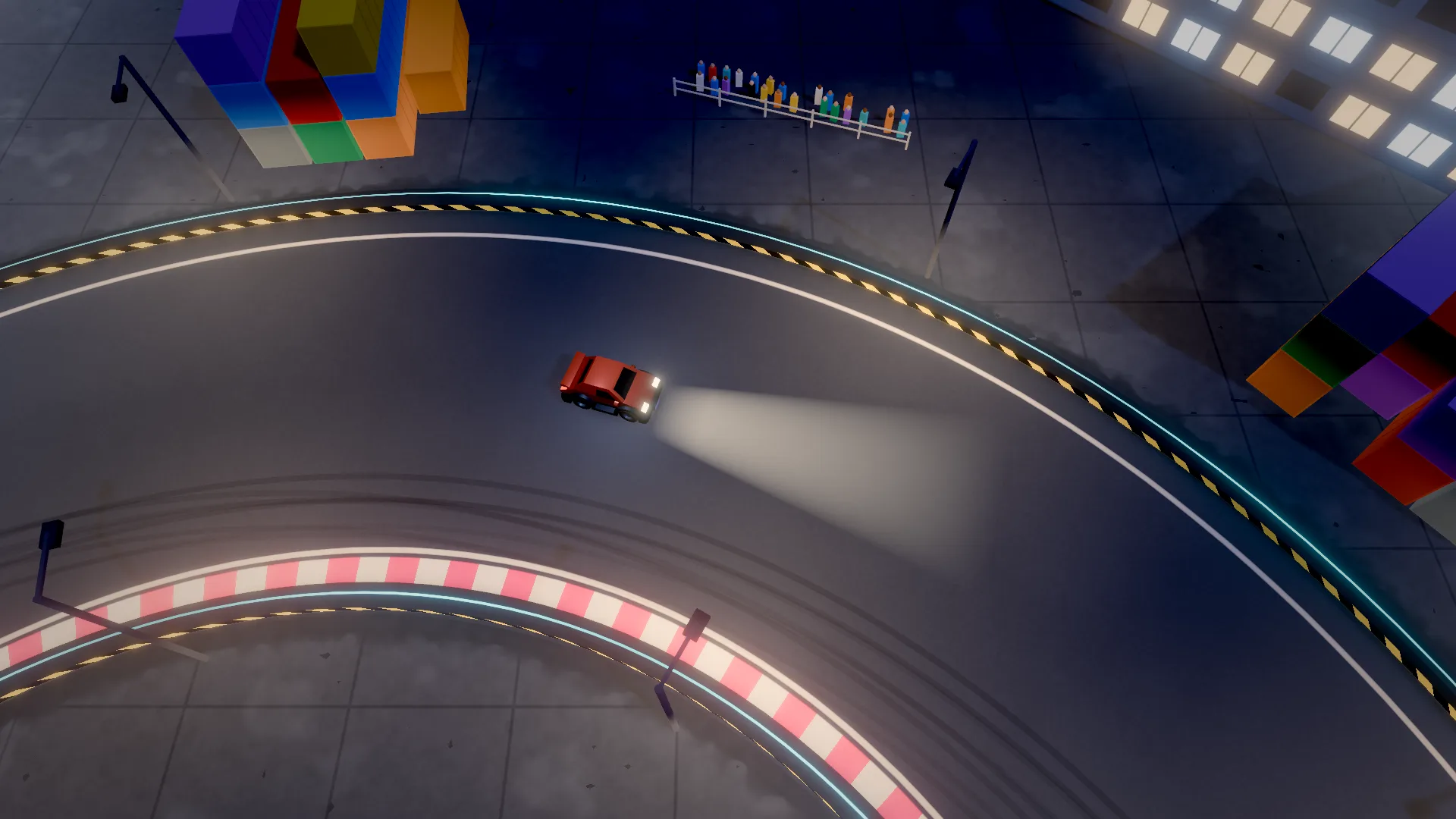
Ours, so we will be precise. A top-down drift game with 20 tracks, each a three-lap time attack with a ghost of your best run and an online leaderboard. It was built for the keyboard: the car's counter-steer assist makes four keys enough to hold a proper slide (our drifting explainer covers how).
Driving: W/↑ throttle, S/↓ brake, AD/←→ steer, Space handbrake, R restart, C camera. Menus: ←→ pick a track, 1–9 jump to one, Enter race, Esc pause, P paint, M sound. The one thing that needs a pointer is the optional X sign-in for the leaderboard, which happens on X's own page.
2. Celeste Classic (platformer)
The original Celeste, made by Maddy Thorson and Noel Berry in four days for the PICO-8 fantasy console, before the full game. Free in the browser on its itch.io page. Keys: arrows to move, X and C to jump and dash.
3. Chrome Dino (endless runner)
Google's offline dinosaur. It appears when Chrome has no connection, or any time at chrome://dino. Keys: Space or ↑ to jump, ↓ to duck. No menus at all.
4. 2048 (puzzle)
Gabriele Cirulli's sliding-number puzzle, open source under the MIT licence and still free in the browser. Keys: the arrow keys slide every tile at once. Perfect for one hand.
5. Monkeytype (typing)
An open-source typing test, and the purest keyboard game there is. Keys: you type; Esc opens a command line that reaches the settings without the mouse.
6. PolyTrack (racing)
A low-poly time-trial racer by Kodub, inspired by TrackMania, free on itch.io. Keys: WASD or arrows, R to restart a run.
On PC (paid)
7. Celeste
The full game: a hard, kind platformer about climbing a mountain. Windows, Mac, Linux and consoles. Keys (default): arrows to move, C jump, X dash, Z to grab, all rebindable.
8. Hollow Knight
Team Cherry's huge underground action game. Keys: arrows to move, Z jump, X attack, C dash, A focus/cast, Tab map, I inventory, Esc pause; every key can be remapped.
9. Crypt of the NecroDancer
A roguelike dungeon crawler where every move has to land on the beat of the music. Brace Yourself Games built it for the arrow keys: you move and attack with them, and use items by pressing two arrows together.
10. Baba Is You
A puzzle game where the rules are blocks of words you push around ("WALL IS STOP"). Keys: arrows or WASD to move, Z to undo, R to restart.
11. Super Hexagon
Terry Cavanagh's brutal minimalist reflex game: you only rotate left and right to slip through closing walls. Two keys, endless retries.
12. Undertale
Toby Fox's RPG where you can talk your way out of every fight. Battles are dodging bullets with your heart, so it is all about the arrow keys. Keys: arrows to move, Z or Enter to confirm, X or Shift to cancel, C or Ctrl for the menu. The game never uses a mouse.
13. The Binding of Isaac: Rebirth
A twin-stick roguelike that plays perfectly on a keyboard because the "second stick" is the arrow keys. Keys: WASD to move, arrows to shoot in four directions, E bomb, Space active item, Q pill or card.
14. The Typing of The Dead: Overkill
A zombie rail shooter where every shot is a word you type. Silly, gory and the most fun way to practise typing speed. Keys: the whole keyboard; there is nothing to aim.
Old-school keyboard games
Before every computer came with a mouse, games had to be played on the keys, and some of the best of them are still alive and free to play. They suit people who would rather think than react.
15. Tetris (puzzle)
The official free version is on tetris.com and runs in a browser tab. By default ←→ move the piece, ↑ rotates it, ↓ drops it faster and Space drops it at once; the controls can be changed in its settings. More on playing it on the arrows alone in arrow key games.
16. NetHack (roguelike)
A dungeon crawler first released in 1987 and still maintained, free and open source. Every action is a key: you move with hjkl (or the number pad), pick things up with ,, open the inventory with i, and ? lists the rest. The learning curve is famous; so are the stories people tell about it.
17. Dungeon Crawl Stone Soup (roguelike)
A friendlier, open-source descendant of the same idea, free to download or to play in your browser: the official site's "Play Online" button opens a WebTiles server, with simple 2D graphics instead of letters. A mouse works in the tiles version, but the game is built for the keyboard, and new players can pick a tutorial from its first menu.
18. Zork (text adventure)
The 1980 Infocom classic: you read a description of where you are and type what to do, like OPEN MAILBOX or GO NORTH. No graphics, no mouse, just you and a parser. In November 2025 Microsoft released the source code of Zork I, II and III under the MIT licence; the games run in any Z-machine interpreter, and the Zork Anthology is still sold. Modern free text adventures (interactive fiction) work the same way and are easy to find on itch.io.
Free on PC: a racer and a fighter
Two free downloads that the other keyboard-only lists keep naming, and with reason.
19. Trackmania (racing)
Nadeo and Ubisoft's stunt time-trial racer. The free Starter Access gives you the seasonal official campaign of 25 tracks, with medals and leaderboards; it needs a Ubisoft account. Keys: arrows or WASD to drive (up throttle, down brake), Backspace to respawn at the last checkpoint, Delete to give up and restart, all rebindable. Keys steer all or nothing, which in Trackmania is less of a handicap than you would think: lines are learned, then repeated. If you like that loop, our time-trial racing games list has more.
20. Fantasy Strike (fighting)
The rare fighting game made for the keyboard. Its Steam page says it was designed to work great on one, and every special and super move is a single button press, so there are no quarter-circle motions to fumble on keys. It is free to play on Steam with all characters available; extras cost money. A good answer to "are there fighting games you can play on a keyboard": most big ones accept keys, but they are built around a stick.
Shoot 'em ups and survival
Two more genres the keyboard has always owned: the bullet-dodging shooter, where you only need a direction and a couple of buttons, and the big turn-based survival roguelike, where every action has its own key.
21. Touhou Project (shoot 'em up)
ZUN's long-running series of "bullet hell" shooters: you weave a tiny hitbox through screens full of patterned bullets. It was made for the keyboard from the start. Keys (the mainline Windows games, per the Touhou Wiki): arrows to move, Z to shoot, X for a bomb that clears the screen, and hold Shift to slow down, focus your fire and show your hitbox. The newer mainline games, from Touhou 16 on, are sold on Steam. If you like it, most shoot 'em ups use the same arrows-plus-Z/X layout.
22. Cataclysm: Dark Days Ahead (survival roguelike)
A huge turn-based survival game set after the end of the world: scavenge, craft, build a base, drive a car you put together yourself. It is free and open source, made by volunteers, and its own FAQ says the game relies almost entirely on the keyboard. Keys: every action has a key, all of them listed and rebindable in the options; press ? in game for help, and the main menu's Special menu has a tutorial. Expect a steep start, like NetHack.
Games that only use the arrow keys
A stricter cut: games where the four arrow keys are the whole controller, so one hand is enough and the other can hold a drink (more in one-handed games). From the list above, plus two arcade classics:
- 2048: the arrows are the only input; every press slides the whole board.
- Super Hexagon: during a run you only ever press ← and →.
- Crypt of the NecroDancer: moving, attacking, even using items (two arrows pressed together) all happen on the arrows, on the beat.
- Chrome Dino: ↑ to jump, ↓ to duck (Space also jumps, but you never need it).
- Snake and Pac-Man in the browser: Google's Snake (search "snake game") and the playable 2010 Pac-Man Google Doodle both steer with the arrows and nothing else.
- DRIFTIT, almost: ↑ throttle, ↓ brake, ←→ steer drive the car and pick tracks in the menu; the one extra key is Space for the handbrake, which is what starts a drift. Right thumb on Space, or switch to WASD and keep the thumb there (our drifting guide explains the hand position).
Why the page scrolls when you press an arrow: in a browser the arrow keys and Space also scroll the page. A well-made browser game blocks that while you play (DRIFTIT does, for all four arrows and Space); if a game's page jumps around instead, click into the game once, or play it in fullscreen. It is also why some browser games pick other keys, like IJKL.
Fourteen more, from Run 3 and Moto X3M to Tetris and two-player Fireboy and Watergirl, sorted by how many extra keys they need: arrow key games.
All twenty-two at a glance
| Game | Genre | Price | Where | Main keys |
|---|---|---|---|---|
| DRIFTIT | Drift racing | Free | Browser | WASD/arrows, Space |
| Celeste Classic | Platformer | Free | Browser | Arrows, X, C |
| Chrome Dino | Runner | Free | Chrome | Space, ↓ |
| 2048 | Puzzle | Free | Browser | Arrows |
| Monkeytype | Typing | Free | Browser | Everything |
| PolyTrack | Racing | Free | Browser | WASD/arrows, R |
| Celeste | Platformer | Paid | PC, Mac, consoles | Arrows, C, X, Z |
| Hollow Knight | Action | Paid | PC, Mac, consoles | Arrows, Z, X, C |
| Crypt of the NecroDancer | Rhythm roguelike | Paid | PC, consoles | Arrows |
| Baba Is You | Puzzle | Paid | PC, Mac, Switch | Arrows, Z, R |
| Super Hexagon | Reflex | Paid | PC, Mac, mobile | ← → |
| Undertale | RPG | Paid | PC, Mac, consoles | Arrows, Z, X, C |
| The Binding of Isaac: Rebirth | Roguelike shooter | Paid | PC, Mac, consoles | WASD, arrows, E, Space |
| The Typing of The Dead: Overkill | Typing shooter | Paid | PC | Typing |
| Tetris | Puzzle | Free | Browser | Arrows, Space |
| NetHack | Roguelike | Free | PC, Mac, Linux | Letters, numpad |
| Dungeon Crawl Stone Soup | Roguelike | Free | Browser, PC, Mac, Linux | Letters, numpad |
| Zork | Text adventure | Free source / paid anthology | Any interpreter | Typing |
| Trackmania | Racing | Free (Starter Access) | PC | Arrows/WASD, Backspace |
| Fantasy Strike | Fighting | Free to play | PC (Steam) | One button per move |
| Touhou Project | Shoot 'em up | Paid | PC (Steam from Touhou 16) | Arrows, Z, X, Shift |
| Cataclysm: Dark Days Ahead | Survival roguelike | Free, open source | PC, Mac, Linux | Every action a key, ? |
Popular games that are not keyboard only
Some games show up on "play without a mouse" lists but really want one: Slay the Spire, FTL and Civilization are point-and-click at heart, and any shooter with mouse aim is out. A good test before you buy: look at the store page's controls section or a screenshot of the key bindings. A "full controller support" badge is a good sign too: a gamepad has no pointer, so those games' menus must work without one, and most of them also let you drive the menus from the keyboard. Speaking of which: browser games with controller support.
Tips for playing on keys
- Steering with keys is all or nothing. A key is either pressed or not, so in a racing game tap it for small corrections and hold it for big ones. DRIFTIT smooths the steering for you, and its keyboard drifting guide shows the rhythm. More racers that work on keys: racing games you can play on a keyboard.
- Mind ghosting. Cheap keyboards cannot register some combinations of three or more keys at once. If a key "does nothing" while you hold two others, try the arrow keys instead of WASD, or the other way round.
- Give the game focus once. A browser game only hears the keyboard when its tab has focus: if keys do nothing, the address bar still has focus, and one click on the game fixes it. That is the only click you need.
On a laptop and want the full picture, Mac included? See games for a laptop without a mouse or trackpad. Want nothing installed at all? Games without downloading.