In short: left hand free → DRIFTIT (racing) or Baba Is You (puzzle). Right hand on the arrows → 2048, Chrome Dino, Snake, Super Hexagon. Mouse only → chess, Solitaire, Wordle, slither.io, Slay the Spire. Bigger PC games → Vampire Survivors (left hand), Civilization VI, XCOM 2, Disco Elysium (mouse). Short on time rather than hands? See short games for a break.
What makes a game one-handed
A game is one-handed when every action you need while playing sits under one hand at the same time. That rules out most PC games, which split the work: left hand on the keys to move, right hand on the mouse to aim. It leaves three groups:
- Left side of the keyboard only. WASD under the fingers, Space under the thumb, a few nearby letters. The best group for real-time games, because the thumb adds a fifth button.
- Arrow keys only. Four keys under the right hand. Great for puzzles and simple reflex games.
- Mouse only. Point and click (or drag). Best for turn-based games, where there is no timer pushing you.
The menus count too: a game is only truly one-handed if you can also start it, pause it and retry without switching to the other side of the desk. We note where that holds.
Left hand: WASD and Space
1. DRIFTIT (drift racing, free, browser)
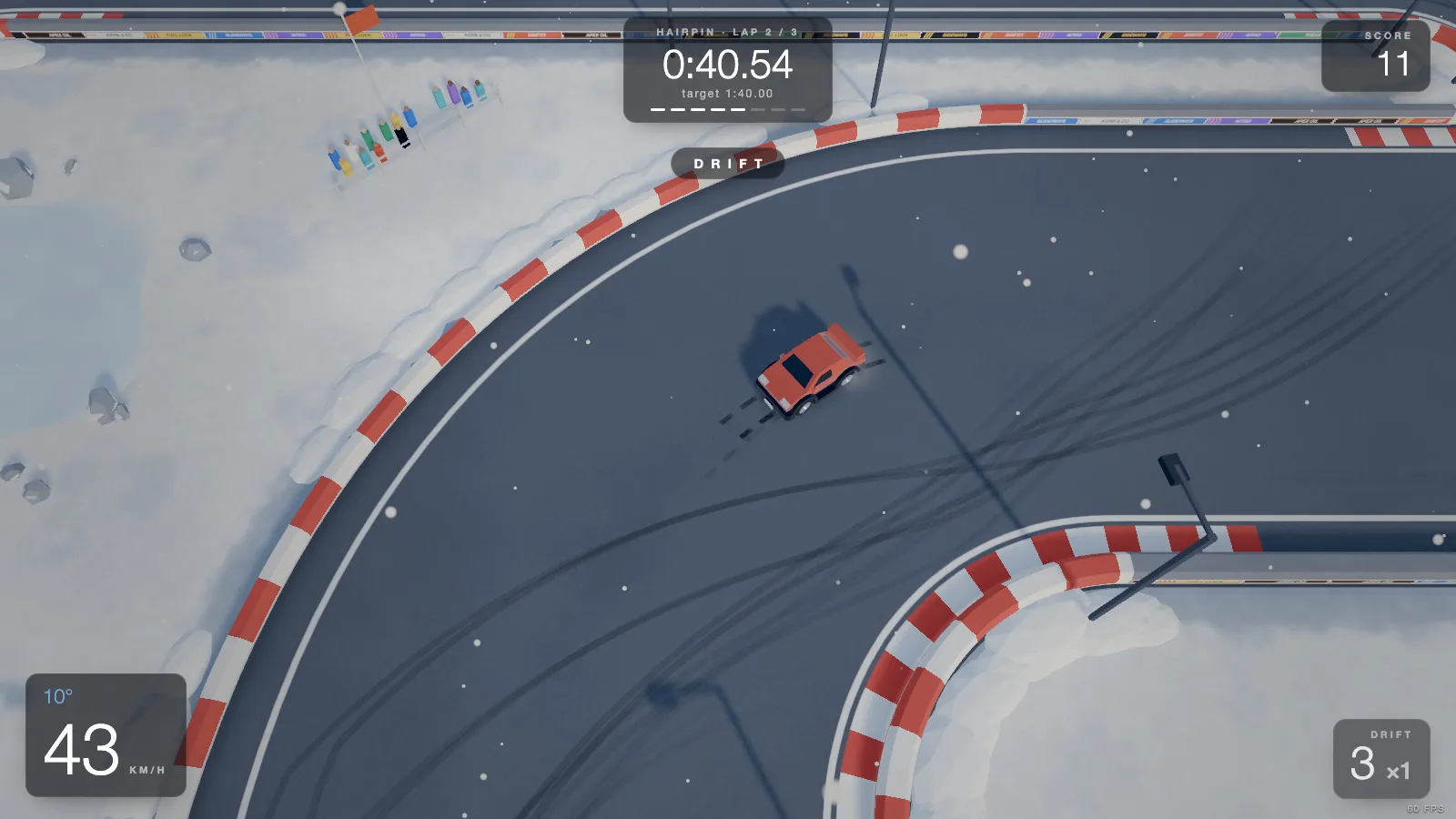
Ours, so we checked every key in the code. DRIFTIT is a top-down drift game in the browser: 20 short tracks, three laps each, a ghost of your best run and online leaderboards. Racing games are rarely one-handed, but this one is played on the left half of the keyboard and nothing else.
- Driving: W throttle, S brake, AD steer, Space handbrake (the thumb), R restart the run, C camera.
- Menus: AD pick a track, Space race, 1–9 jump straight to a track, Esc pause.
- Right hand instead? Everything that drives also works on the arrows (↑ throttle, ↓ brake, ←→ steer), and the menu takes ←→ and Enter. The handbrake stays on Space, which is a stretch for one right hand: drive with the arrows and reach over only when you want to start a drift, or stick to the left side.
Why it works with one hand: the steering is smoothed and the car's counter-steer assist helps hold a slide, so four fingers and a thumb are enough for a proper drift (the drifting guide shows the hand position). No account, no download; the X sign-in for the leaderboard is optional. It is desktop only: on a phone the game shows a "Play it on a computer" screen.
Play DRIFTIT free Buy on Steam
2. Baba Is You (puzzle, paid, PC / Mac / Switch)
A puzzle game where the rules are word blocks you push around ("WALL IS STOP"). It is turn-based, so nothing happens until you press a key. Keys: WASD (or the arrows) to move, Z to undo, R to restart: all on the left side, so the right hand can rest.
Right hand: the arrow keys
3. 2048 (puzzle, free, browser)
Gabriele Cirulli's number-merging puzzle. The four arrow keys are the whole game: every press slides all the tiles. No timer, so it suits a slow, relaxed hand too.
4. Chrome Dino (runner, free, Chrome)
The dinosaur Chrome shows when you are offline, or at chrome://dino. ↑ jumps, ↓ ducks. Two keys, one finger each.
5. Google Snake (arcade, free, browser)
Search "snake game" on Google and a playable Snake appears above the results. The arrow keys steer and that is the whole control scheme.
6. Super Hexagon (reflex, paid, PC / Mac / mobile)
Terry Cavanagh's minimalist reflex game: you rotate a small triangle with ← and → to slip through closing walls. Fast and hard, but two keys is all it asks.
More games for the four arrows, sorted by how many other keys they need, are in arrow key games.
Mouse only
7. Chess on Lichess (free, browser)
Lichess is a free, open-source chess site with no ads. You move by dragging a piece or clicking it and then its square, so the mouse is all you need. Pick a long time control, or play correspondence or the computer, and there is no clock pressure at all.
8. Google Solitaire and Minesweeper (free, browser)
Search "solitaire" or "minesweeper" on Google and both games open right in the results page. Solitaire is click and drag; Minesweeper is a click to dig and a right-click to flag a mine, both on the same mouse.
9. Wordle (free, browser)
The New York Times' daily five-letter word game has its own on-screen keyboard, so you can enter every guess with mouse clicks (or one finger on a touch screen).
10. Cookie Clicker (free, browser)
Orteil's idle game, where you click a cookie and spend the cookies on things that bake more cookies. It is built for one hand on the mouse, and once you buy a few helpers it keeps baking on its own.
11. slither.io (free, browser)
The online snake game: your snake follows the mouse pointer, and holding the left button gives a speed boost. Real-time and online, so it is the one fast-paced mouse-only pick here.
12. Slay the Spire (paid, PC / Mac / consoles)
A deck-building roguelike, turn-based and played by clicking cards and targets. It never asks for a key, so it is a favourite for one-handed players who want a deep game.
13. Into the Breach (paid, PC / Mac / consoles)
A small turn-based tactics game about mechs and giant bugs, from the makers of FTL. Every move is a click on the grid, and you can see exactly what the enemy will do next turn, so there is time to think.
Bigger PC games people play one-handed
These are the games that come up again and again when one-handed players compare notes. None is free, but all are well known, so they are easy to find in a sale.
14. Vampire Survivors (action, paid on PC, free on phones)
A survival game where you never press an attack button: your weapons fire on their own and you only walk, on WASD or the arrows. A run lasts up to 30 minutes and gets frantic, but the controls never grow past four directions and a few menu picks when you level up. On PC, Mac, consoles, and free on iOS and Android.
15. Brotato (action, paid, PC / Mac / consoles / mobile)
The same idea in short arena waves: a potato with up to six weapons that aim and fire by themselves (manual aiming is an option you can leave off). You move with WASD and shop between waves with clicks.
16. Disco Elysium (RPG, paid, PC / Mac / consoles)
A detective role-playing game with no combat to speak of: you click where to walk and click your lines of dialogue. There is no timer anywhere, so it is the classic pick for a long stretch of one-handed play.
17. Civilization VI (strategy, paid, PC / Mac / consoles)
Turn-based empire building. Every unit order, city choice and research pick is a click, and turns wait for you. It has hotkeys, but you never need them.
18. XCOM 2 (tactics, paid, PC / Mac / consoles)
Turn-based squad tactics: click a soldier, click where to move or whom to shoot. Bigger and harder than Into the Breach, and just as happy to be played with the mouse alone.
19. Baldur's Gate 3 (RPG, paid, PC / Mac / consoles)
A huge role-playing game with turn-based fights. You click to move, every action sits on a clickable bar at the bottom of the screen, and combat waits for your move. The keyboard shortcuts are a convenience, not a requirement.
20. Peggle (puzzle, paid, PC / Mac)
PopCap's pachinko puzzle: aim the ball launcher with the mouse and click to shoot. One click per shot, nothing else, and still oddly tense.
All twenty at a glance
| Game | Hand | Pace | Price | Where |
|---|---|---|---|---|
| DRIFTIT | Left (WASD + Space) | Real time | Free | Browser (desktop) |
| Baba Is You | Left (WASD, Z, R) | Turn-based | Paid | PC, Mac, Switch |
| 2048 | Right (arrows) | Turn-based | Free | Browser |
| Chrome Dino | Right (↑ ↓) | Real time | Free | Chrome |
| Google Snake | Right (arrows) | Real time | Free | Browser |
| Super Hexagon | Right (← →) | Real time | Paid | PC, Mac, mobile |
| Lichess | Mouse | Your choice | Free | Browser |
| Solitaire / Minesweeper | Mouse | Turn-based | Free | Browser |
| Wordle | Mouse | Turn-based | Free | Browser |
| Cookie Clicker | Mouse | Idle | Free | Browser |
| slither.io | Mouse | Real time | Free | Browser |
| Slay the Spire | Mouse | Turn-based | Paid | PC, Mac, consoles |
| Into the Breach | Mouse | Turn-based | Paid | PC, Mac, consoles |
| Vampire Survivors | Left (WASD) or arrows | Real time | Paid (free on phones) | PC, Mac, consoles, mobile |
| Brotato | Left (WASD) + clicks in the shop | Real time | Paid | PC, Mac, consoles, mobile |
| Disco Elysium | Mouse | No timer | Paid | PC, Mac, consoles |
| Civilization VI | Mouse | Turn-based | Paid | PC, Mac, consoles |
| XCOM 2 | Mouse | Turn-based | Paid | PC, Mac, consoles |
| Baldur's Gate 3 | Mouse | Turn-based fights | Paid | PC, Mac, consoles |
| Peggle | Mouse | Your pace | Paid | PC, Mac |
Making more games one-handed
If one hand is how you play long term, not just for an afternoon, the list above is only the start. Four things widen it a lot:
- Remap the keys. Many PC games let you rebind every action in the settings. Move everything to the left side (around WASD, QERF, Shift, Space) or around the arrows and the number pad.
- Sticky Keys. Windows and macOS both have it in their accessibility settings: a modifier like Shift or Ctrl stays pressed until the next key, so combinations no longer need two fingers at once.
- One-handed hardware. Gaming keypads (a compact half keyboard for the left hand) put the keys a game needs under one hand. Microsoft's Xbox Adaptive Controller goes further: large buttons plus ports for switches and other devices, and it works on Windows PCs as well as Xbox.
- Check before you buy. Accessibility reviews such as those on Can I Play That? describe controls and remapping in detail, and charities like AbleGamers help players find a setup that works.
A gamepad can also be held and played in one hand for simple games; DRIFTIT supports one (left stick steers, triggers for throttle and brake, A for the handbrake), but it needs both thumbs, so for one hand the keyboard is the better fit. More on pads in browser games with controller support.
Related lists
- Keyboard-only games: no mouse at all, with two hands.
- Laptop games without a mouse or trackpad.
- Short games for a break: the five-minute kind.
- Games without sign-up: start in one click.