In short: arrows and nothing else → 2048, Google Snake, Pac-Man, Chrome Dino, Hextris, Run 3, Moto X3M (all free), Super Hexagon and NecroDancer (paid). Arrows plus one key → DRIFTIT (drifting, + Space), Tetris, Celeste Classic, Doodle Champion Island. Two players on one keyboard → Fireboy and Watergirl. The table has every key.
What counts as an arrow key game
A game makes this list when the arrow keys do the main job, moving or steering, and you never need the mouse while you play. We split them by what else you have to press, because that is what decides whether one hand is enough:
- Arrows only: the four keys are the whole controller. One hand, any keyboard, even a laptop with tiny half-height arrows.
- Arrows plus one or two keys: usually Space or a letter like X and C for a jump or an action. Two hands, but still no mouse.
- Arrows for one player, WASD for the other: the classic way to share one keyboard.
If you want the wider list, games with no mouse at all but any keys, see keyboard-only games; if one hand is the point, one-handed games sorts games by the free hand.
Arrows only
1. 2048 (puzzle, free, browser)
Gabriele Cirulli's number puzzle from 2014, open source and still free on its own page. Every arrow press slides all the tiles that way and merges equal numbers; reach the 2048 tile to win. There is no timer, so it is the calmest game here.
2. Google Snake (arcade, free, browser)
Search "snake game" on Google and a playable Snake opens above the results. The arrows steer the snake to the apples; the settings change the map, the speed and the fruit. Nothing to install and no account.
3. Pac-Man Google Doodle (arcade, free, browser)
Google's playable Doodle for Pac-Man's 30th anniversary in 2010 is still online: search "pac-man" on Google. The arrows steer Pac-Man through the maze, which spells out "Google". The original arcade rules, ghosts included.
4. Chrome Dino (runner, free, Chrome)
The dinosaur Chrome shows when you are offline, or any time at chrome://dino. ↑ jumps over the cacti, ↓ ducks under the birds (Space also jumps, but you never need it).
5. Hextris (puzzle, free, browser)
A Tetris-like puzzle on a hexagon, open source and free in the browser. Blocks fall towards the centre from all six sides; ← and → rotate the hexagon so they stack in matching colours, which clears them. Two keys and a lot of panic.
6. Run 3 (runner, free, browser)
Joseph Cloutier's endless runner through a tunnel in space, a school-computer classic. ← and → move you, and running onto a wall turns it into the floor; ↑ jumps over the gaps (Space works too).
7. Moto X3M (bike stunts, free, browser)
A motorbike stunt racer over ramps, loops and explosive obstacles. By default ↑ accelerates, ↓ brakes, and ←→ lean the rider back and forward to balance the landing and to flip in the air. Short levels, timed, with three stars for a fast run.
8. Super Hexagon (reflex, paid, PC / Mac / mobile)
Terry Cavanagh's minimalist reflex game: you rotate a small triangle around the centre with ← and → to slip through walls that close in to the beat. Only two keys, and still one of the hardest games on any list.
9. Crypt of the NecroDancer (rhythm roguelike, paid, PC / consoles)
A dungeon crawler where every move has to land on the beat. Brace Yourself Games built the whole game for the arrows: you move and attack with them, and use items or spells by pressing two arrows together.
Arrows plus one or two keys
10. DRIFTIT (drift racing, free, browser)
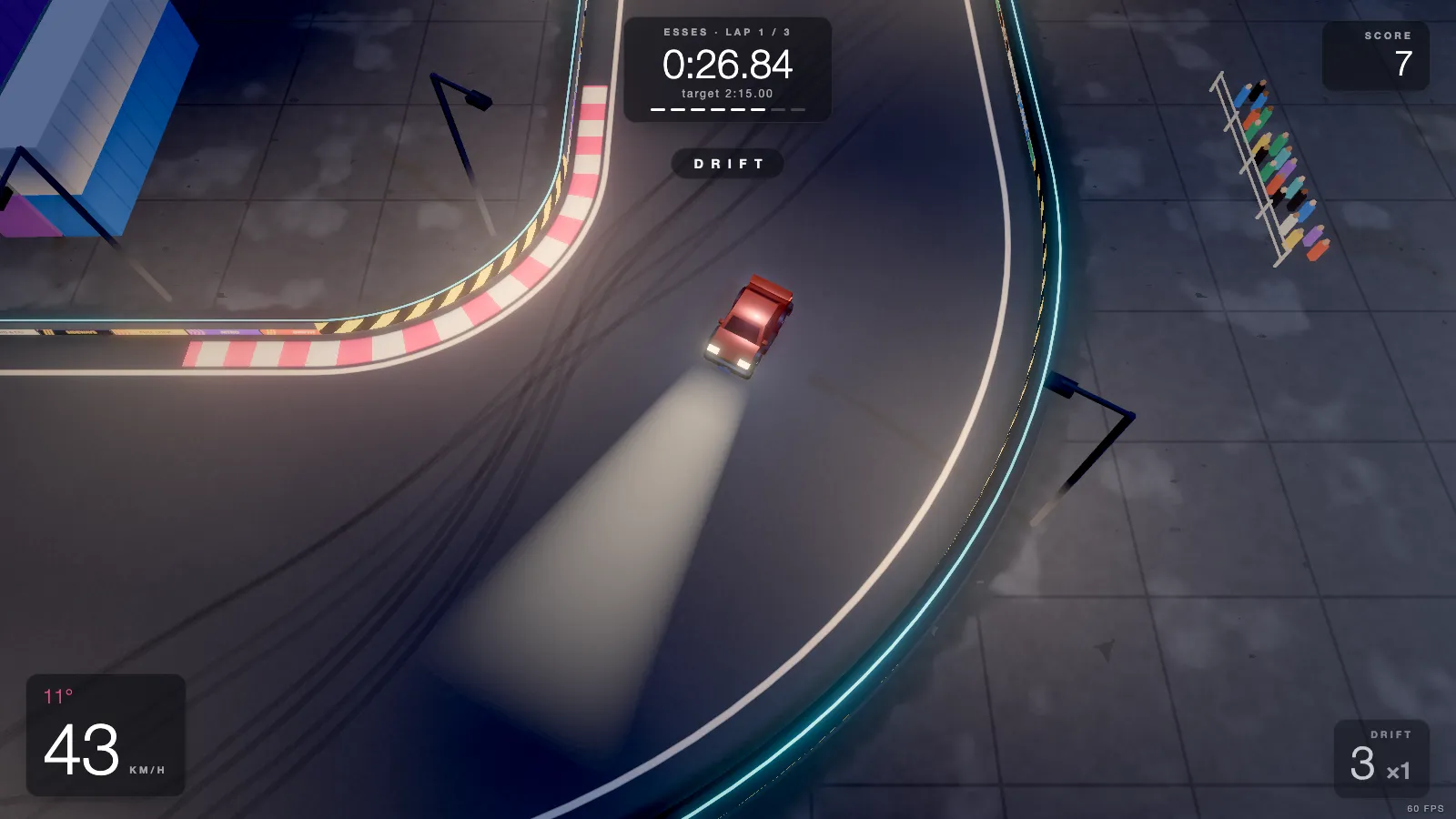
Ours, so we checked every key in the code. DRIFTIT is a top-down drift game in the browser: 20 short tracks, three laps each, a ghost of your best run and online leaderboards. The car is driven on the arrows and the one extra key is the handbrake:
- Driving: ↑ throttle, ↓ brake, ←→ steer, Space handbrake (that is what kicks the car into a drift), R restart, C camera.
- Menus: ←→ pick a track, Enter or Space race, 1–9 jump to a track, Esc pause. No mouse at any point.
- Prefer WASD? WASD do exactly the same as the arrows, and your left thumb rests on Space, which many drifters find easier. Both work at the same time, so you can switch mid-race.
Steering on a key is all or nothing, so the game smooths it for you and the car's counter-steer assist helps hold a slide; the keyboard drifting guide explains the rhythm. The page never scrolls when you press an arrow or Space: the game blocks that while you drive. No account and no download (the X sign-in for the leaderboard is optional). Desktop only: on a phone it shows a "Play it on a computer" screen.
Play DRIFTIT free Buy on Steam
11. Tetris (puzzle, free, browser)
The official free version is on tetris.com. By default ←→ move the piece, ↑ rotates it, ↓ drops it faster and Space drops it at once; a couple of letter keys add hold and the other rotation, and the controls can be changed in its settings. You can play a whole game on the arrows if you skip the instant drop.
12. Celeste Classic (platformer, free, browser)
The original Celeste, made by Maddy Thorson and Noel Berry in four days for the PICO-8 fantasy console, before the full game. Free in the browser on its itch.io page. Arrows to move, C to jump, X to dash: tight, precise and short enough for one sitting.
13. Doodle Champion Island Games (sports adventure, free, browser)
Google's big 2021 Doodle for the Tokyo Olympics: a small open-world adventure where a ninja cat takes on seven sports mini-games. Search "Doodle Champion Island" to play it. The arrows walk you around the island and play the events, and Space is the action button.
Two players on one keyboard
14. Fireboy and Watergirl (co-op puzzle platformer, free, browser)
Oslo Albet's co-op series, the reason a lot of people learned that a keyboard holds two players. One player moves Fireboy on the arrow keys, the other moves Watergirl on WAD. Fireboy must stay out of the water and Watergirl out of the lava, so you only finish a temple by helping each other through it.
That split, arrows on the right and WASD on the left, is the standard for two-player browser games of every kind. Keyboards cannot always register many keys at once, though (see ghosting below), so a fast two-player game can drop a press now and then.
All fourteen at a glance
| Game | Genre | Keys besides arrows | Price | Where |
|---|---|---|---|---|
| 2048 | Puzzle | None | Free | Browser |
| Google Snake | Arcade | None | Free | Browser (Google) |
| Pac-Man Doodle | Arcade | None | Free | Browser (Google) |
| Chrome Dino | Runner | None (↑ ↓) | Free | Chrome |
| Hextris | Puzzle | None (← →) | Free | Browser |
| Run 3 | Runner | None | Free | Browser |
| Moto X3M | Bike stunts | None | Free | Browser |
| Super Hexagon | Reflex | None (← →) | Paid | PC, Mac, mobile |
| Crypt of the NecroDancer | Rhythm roguelike | None | Paid | PC, consoles |
| DRIFTIT | Drift racing | Space | Free | Browser (desktop) |
| Tetris | Puzzle | Space (optional) | Free | Browser |
| Celeste Classic | Platformer | C, X | Free | Browser |
| Doodle Champion Island | Sports adventure | Space | Free | Browser (Google) |
| Fireboy and Watergirl | Co-op platformer | Player 2 on W A D | Free | Browser |
Arrow keys or WASD?
Both are right, for different games. WASD became the PC standard with mouse-aimed shooters: the left hand moves, the right hand aims, and the left fingers can reach Shift, Space, Q, E, R and the number row without looking. The arrows win when there is no mouse: they sit apart from the letters, the inverted-T shape is easy to find by touch, and they leave the left hand free (or let one right hand play on its own).
- Use the arrows for puzzles, arcade games, runners and anything on this list; for one right hand; and on laptops where the arrows are the only keys with a gap around them.
- Use WASD when a game needs many extra keys or the mouse, or when your left thumb should sit on Space (a handbrake, a jump) while you steer.
- Many games take both, DRIFTIT, Hextris and Baba Is You among them. Try each for a few minutes; whichever hand feels calmer is the right one.
When the arrow keys misbehave
- The page scrolls instead of the game moving. In a browser the arrows and Space scroll the page. A well-made game blocks that while it has focus; if yours does not, click inside the game once, or switch to fullscreen. If the keys do nothing at all, the address bar still has focus: one click on the game fixes it.
- A key "does nothing" while you hold two others. That is ghosting: many keyboards, especially cheap ones and some laptops, cannot register every combination of three or more keys at once. Try WASD instead of the arrows (or the other way round), since a different set of keys may not clash; gaming keyboards with "anti-ghosting" or "n-key rollover" avoid it.
- Arrows type numbers or jump the cursor. On a full keyboard, the arrows on the number pad only work as arrows with Num Lock off. Use the separate arrow cluster, or turn Num Lock off.
- Tiny laptop arrows. On many laptops ↑ and ↓ share one key's height. If your fingers keep slipping, pick a game with fewer keys (Hextris, Super Hexagon, Moto X3M) or switch to WASD where the game allows it.
Related lists
- Keyboard-only games: no mouse at all, with any keys.
- One-handed games: sorted by the hand you have free.
- Laptop games without a mouse or trackpad, Mac included.
- Racing games you can play on a keyboard: arrows or WASD, no controller.
- Games without downloading: everything runs in a tab.
- Short games for a break: the five-minute kind.