In short: the best free games on a Chromebook are browser games, because they run on every model, school ones included, with nothing to install. For driving: DRIFTIT (drifting, arrows or WASD + Space), PolyTrack and Slow Roads. For a quick break: Tetris, 2048, Celeste Classic, Monkeytype and Chrome's own dinosaur game (works offline). Minecraft Classic runs in the browser too. Bigger games need Google Play or cloud gaming; Steam on Chromebook is gone.
The four ways to play on a Chromebook
| Way | Download? | What it needs | Cost |
|---|---|---|---|
| Browser games | No | Chrome with WebGL; a keyboard | Often free |
| Android apps | Yes, from Google Play | A Chromebook that supports Play; not always allowed on school devices | Free or paid per app |
| Cloud gaming | No game install | A reliable, fast internet connection | Usually a subscription |
| Steam | Was a download | The beta ended on 1 January 2026 | n/a |
Android apps from Google Play
Google's Play help says the Play Store is available on only some Chromebooks. To check yours, open Settings → Apps → Manage Google Play preferences; if the option is not there, your Chromebook does not run Android apps. Two catches from the same page: apps you have on your phone are not installed automatically, and on a work or school Chromebook your administrator may not let you add the Play Store at all.
One useful detail: many Android games show an on-screen overlay of keyboard controls, and Google's help says you can remap the keys with Ctrl + 8. Google's own Chromebook gaming page suggests Roblox, Clash of Clans, Minecraft and Stardew Valley as Android picks.
Cloud gaming
Cloud gaming runs the game on a server and streams the picture to your Chromebook, so the Chromebook's own chip barely matters. Google's Chromebook gaming pages list NVIDIA GeForce NOW (play games you already own), Xbox Cloud Gaming (Beta) with Xbox Game Pass Ultimate, Amazon Luna (a rotating selection included with Prime) and Boosteroid. Google's own wording on what you need is "a reliable internet connection". In practice that is the limit: on school Wi-Fi or a phone hotspot, streaming is the first thing to stutter.
What happened to Steam on Chromebook
Google ran "Steam for Chromebook (Beta)" on a list of select models. Its help page set the minimum at an Intel i3 or Ryzen 3 processor, 8 GB of RAM and 128 GB of storage, which ruled out most school and budget Chromebooks anyway. In August 2025, 9to5Google reported a notice Google showed in the Chromebook launcher: the beta "will conclude on January 1st, 2026", after which games installed through it would no longer be playable. If you read an older list that tells you to install Steam on a Chromebook, that advice is out of date. For PC games you own, cloud gaming is what is left.
Browser games: the no-download option
A browser game is a web page that draws a 3D scene with WebGL. Nothing gets installed, it works the same on a Chromebook as on any other laptop, and the only requirement is that Chrome can use the graphics chip. To check, open webglreport.com, a test Google's own Meet help points to: if it reports WebGL as supported and "Major Performance Caveat" as "No", 3D browser games should run. Then close the other tabs before you play; on a Chromebook with 4 GB of memory, that is the easiest win.
1. DRIFTIT (racing · free)
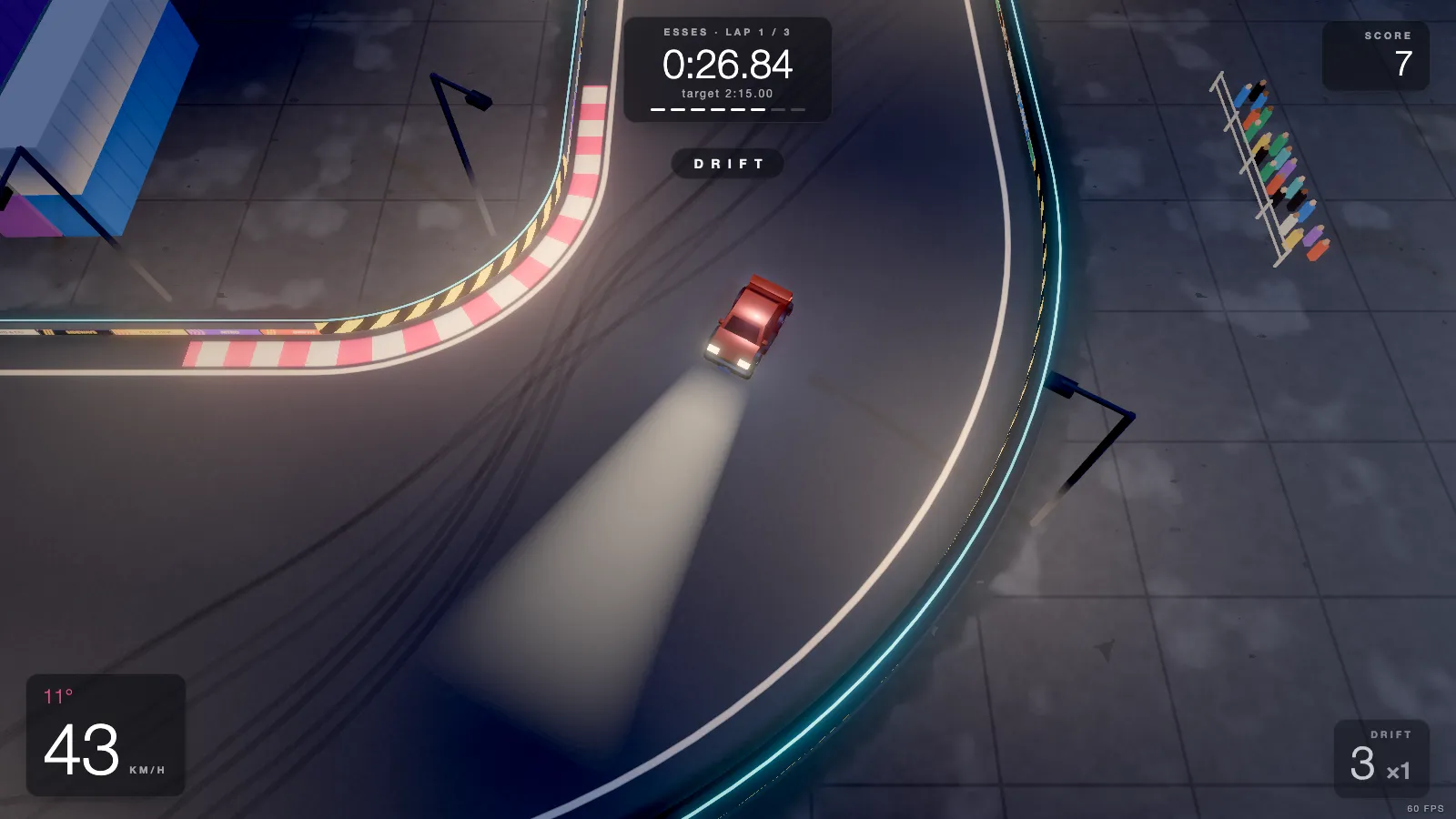
Ours. A top-down drift game: 20 hand-built tracks in 5 low-poly worlds, each a three-lap time attack against a target time, with a ghost of your best run and an online leaderboard per track. No install, no account needed to play, no ads. All tracks are open from the start.
On a Chromebook: we have not tested it on one. It runs in Chrome using WebGL, so it should run if your Chromebook's browser supports WebGL; how smoothly depends on the machine, and we cannot promise a frame rate. The first load is about half a megabyte. The controls fit a Chromebook keyboard: arrows or W A S D to drive, Space for the handbrake, R to restart, and the menus work from the keys too. A standard gamepad works as well.
One quirk: if the window is narrower than 820 pixels (a half-screen split, or a tablet-style Chromebook held upright), the game shows a "Desktop only" screen, because it has no touch controls. Maximise the window, or press "Continue anyway" if you have a keyboard attached.
2. PolyTrack (racing · free)
A low-poly racer by Kodub, inspired by TrackMania: loops, jumps and short tracks where every millisecond counts. It has a track editor for building and sharing your own tracks. It plays in the browser on its itch.io page (free, pay what you want), and there are downloadable versions too, including Android. Controls are W A S D or arrows, with R or Enter to restart.
3. Slow Roads (driving · free)
An endless drive through generated scenery by the developer Anslo, at slowroads.io. No score and no way to fail, and an autodrive mode if you want to sit back. It has graphics settings, and Jalopnik's write-up says a low-power notebook should cope once you turn them down, which makes it a good match for a modest Chromebook.
4. Minecraft Classic (building · browser)
Not racing, but it is the question every Chromebook owner asks. Mojang released Minecraft Classic for the game's tenth anniversary: the 2009 version, with 32 blocks to build with and, in Mojang's words, all the original bugs. It runs at classic.minecraft.net and needs a keyboard and a browser with WebGL and WebRTC. For the full modern Minecraft, Google's gaming page points to the Android version on Google Play.
More free games that run in Chrome
None of these needs an install, a fast graphics chip or a mouse: a Chromebook keyboard is enough for all of them.
5. Tetris
The official free version is on tetris.com and runs in a browser tab. By default ←→ move the piece, ↑ rotates it, ↓ drops it faster and Space drops it at once.
6. 2048
The number-merging puzzle, free in any browser and played with the four arrow keys. It is 2D and tiny, so it runs on the oldest Chromebook.
7. Celeste Classic
The original PICO-8 version of Celeste, free on itch.io in the browser. Short, hard and precise: arrows to move, X and C to jump and dash.
8. Monkeytype
An open-source typing test. Not a game in the usual sense, but it is the one that makes you better at the keyboard every other game on this list uses. You just type; Esc opens a command line for the settings.
9. The Chrome dinosaur game
Chrome ships with an endless runner: the T-Rex that shows up when you are offline. Type chrome://dino into the address bar to play it any time. Space or ↑ jumps, ↓ ducks. It is the one game on this list that needs no internet at all, which makes it the bus-ride pick.
Games on a school Chromebook
A school Chromebook is managed: an administrator decides which websites open, whether the Google Play Store is there and which extensions you can add. That is why the Android and extension routes often do not exist on one. Browser games are the only kind that might work, and only if the school has not blocked the site.
Two cautions. Sites that advertise "unblocked games" are usually copies of other people's games re-hosted on throwaway domains, wrapped in ads; you get an old version and the developer gets nothing. And the "racing games" in the Chrome Web Store are mostly small extensions that copy well-known browser games; an extension can ask for permissions a web page never gets, so check who made it before you add one. When in doubt, follow your school's rules: getting around a block is a good way to lose the Chromebook.
Racing games on a Chromebook, specifically
If you want to race rather than build, the browser is the best place to start, because it works on every Chromebook including school ones that block Google Play. DRIFTIT is the pick for drifting and beating a target time; PolyTrack for short arcade time trials; Slow Roads for no pressure at all. For big-budget racing, Google lists Forza Horizon among the games on Xbox Cloud Gaming, which needs Game Pass Ultimate and a strong connection.
Our wider lists go further: the best browser racing games, driving games without downloading and games for a low-end PC. If you are on a Chromebook without a mouse, keyboard-only games is for you.
Learning to drift on a Chromebook keyboard
Drifting with keys works better than you might expect. Tap Space or lift off the throttle to get the rear of the car sliding, steer into the slide to catch it, and use the throttle to hold the angle. DRIFTIT helps: while the rear slides, it turns the front wheels most of the way toward where the car is going, so your keys only fine-tune the slide. Our guide to drifting on a keyboard goes step by step, and the Oval is the easiest track to learn on before the Esses.
Quick answers
Can I play games on a Chromebook without downloading? Yes: browser games, or cloud gaming if your connection is fast.
What are the best free games on a Chromebook? Browser games: DRIFTIT, PolyTrack, Slow Roads, Minecraft Classic, Tetris, 2048, Celeste Classic, Monkeytype, and the dinosaur game at chrome://dino.
Can I play games on a school Chromebook? Only what your school's administrator allows. Browser games work if the site is not blocked.
Does Steam work on a Chromebook? Not any more. Google's notice said the Steam for Chromebook beta would end on 1 January 2026.
Will DRIFTIT run on my school Chromebook? It should, if the browser supports WebGL and the site is not blocked by your school, but we have not tested it on a Chromebook. It needs a keyboard and a maximised window.